Next-Gen Smart Classrooms
Executive Snapshot
Product: SmartClass CTS (Class Transformation System)
Domain: Education Technology (K–12)
My Role: UX Architect (Hands-on, end-to-end)
Scope: Research, IA, interaction design, usability, classroom validation
Outcome: Improved teacher adoption, content findability, and classroom usability
Problem Context
The Challenge
SmartClass was already deployed in schools, but adoption was inconsistent. Teachers were comfortable with traditional chalk-and-talk methods and struggled to integrate digital content naturally during live teaching.
Key risks:
-
Digital tools interrupted teaching flow
-
Content was hard to find quickly
-
Teachers couldn’t adapt or extend content on the fly
-
Hardware limited simultaneous use of board + digital screen
Users & Environment
Primary Users
-
School teachers (varying digital comfort levels)
-
Classrooms with time pressure, live students, and physical constraints
Context of Use
-
Teaching while standing, speaking, writing
-
Switching constantly between explanation and content
-
Limited tolerance for complexity or delays
Discovery & Key Insights
What We Observed
-
Teachers preferred chalk-and-board because it gave control and flexibility
-
Existing UI behaved like a desktop application, not a classroom tool
-
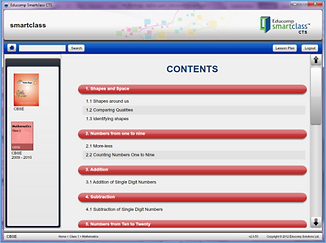
Content hierarchy was deep and hard to scan, hurting findability
-
Teachers wanted to add or extend content, not just consume it
-
Physical setup prevented smooth switching between digital and writing
Teachers don’t want “digital teaching.” They want teaching support that doesn’t break their rhythm.


Design Principles
Based on classroom behavior, we defined clear principles:
-
Minimize disruption during teaching
-
Support quick decisions, not exploration
-
Blend digital with physical teaching
-
Give teachers ownership over content
-
Make navigation shallow, visible, and fast
Solution & Design Decisions
Key Design Decisions
-
Content aligned with physical textbooks → Reduced cognitive load and improved findability
-
Broad & shallow navigation with smart search → Allowed teachers to jump directly to topics mid-class
-
Floating, collapsible menus → Kept content accessible without blocking teaching space
-
Teacher-owned digital repository → Enabled saving annotations and custom material
-
Internet-enabled content extension → Let teachers quickly supplement lessons when needed
-
SmartClass community (collaborative repository) → Encouraged peer sharing and reuse (high adoption feature)
Hardware + Software Integration
Classroom Integration
-
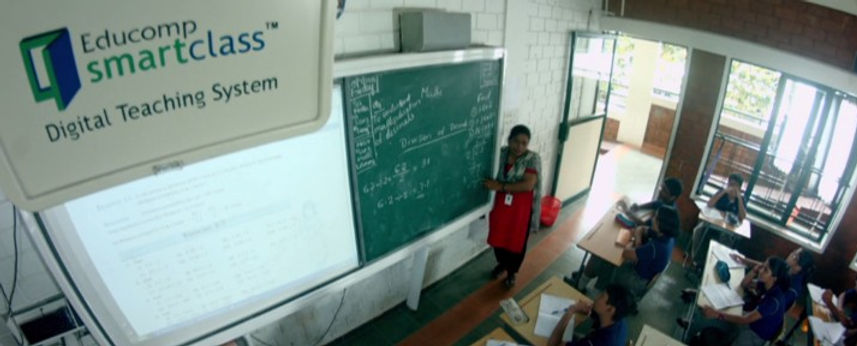
Introduced integrated digital + green board setup
-
Allowed teachers to:
-
Write manually
-
Refer to digital content
-
Switch seamlessly during explanation
-


Outcome & Impact
What Changed
-
Improved teacher confidence and adoption
-
Faster access to relevant teaching material
-
Reduced friction during live classes
-
Greater sense of ownership among teachers

Reflection
What This Project Demonstrates
-
Deep empathy for non-technical users
-
Ability to design for live, high-pressure environments
-
Strong grounding in information architecture and findability
-
UX that balances software, hardware, and human behavior